Black Friday Is the Ultimate Test of Your Catalog’s Flexibility: 8 Things to Prep in Advance

Black Friday, Cyber Monday, holiday promos, end-of-year sales… The final months of the year are an incredibly intense period of change for ecommerce.
Prices fluctuate, promoted items shift, messaging, images, product bundles, and sales channels all evolve. Some products need a heavy marketing push, while others need to be pulled from campaigns entirely. Part of your inventory might require extra backing, whereas items that sell consistently well on their own may just need a slight discount.
During this season, merely having "correct" product data isn't enough.
You need a catalog that can quickly adapt to a shifting landscape. You need absolute flexibility in your product management. That’s why your Black Friday prep shouldn't start with setting discount tiers, but with checking if your catalog is built for this kind of dynamic environment.
In this article, we’ll break down 8 areas to get in order ahead of time. This way, you can avoid manually rebuilding your catalog and focus on what matters: driving sales.
1. Start with the products that actually need your attention
Black Friday is often associated with a simple formula: slash prices and wait for the traffic. In reality, however, you should start by asking a different question: Which products genuinely need a sales boost?
You might find that some stock has been gathering dust in the warehouse for months, while other items consistently fly off the virtual shelves with zero extra help. Not all products should get the same treatment, and guess what - Black Friday is a great opportunity to help free up space from storage rooms.
Sales data, stock levels, and inventory age can help you pinpoint which products to heavily promote. The catch? The data you need for this analysis usually lives in siloed systems.
That’s why it pays to build a broader view of your products within your product catalog by integrating data from other sources.
This lets you not only see what you're selling, but also easily flag what needs the team's attention before a campaign goes live.
And this leads to another crucial question: Is a product actually selling poorly, or are you just not presenting it well enough?
Before you resort to steep discounts, audit your data quality.
Tip: In the video at the end of this article, we show you one way to organize your products before putting them on promotion.
2. Make sure your products are actually retail-ready
A product might live in your catalog, but that doesn't mean it’s ready to convert. Why? Because of missing product information.
A missing image. An incomplete description. A crucial spec left blank. The wrong category. Missing variant details.
In your day-to-day operations, isolated gaps might slip under the radar, but right before a massive campaign, they quickly snowball into a major problem. What's more, the research is clear: consumers will bounce if they spot errors or gaps in product info—up to 97% of shoppers admit to abandoning a cart for this exact reason (based on our own research in the Polish market).
Consumer trend data backs this up: before Black Friday, audit your entire catalog for completeness, then isolate the products that need filling in.
Depending on your industry, the critical gaps in your product attributes will vary. In electronics, tech specs and compatibility are king. In fashion, it’s size, material, and fit. For furniture, it's dimensions, assembly instructions, and available variants.
Not every missing piece of data is equally detrimental to your bottom line.
So, instead of trying to fix everything at once, identify the information that actually drives purchasing decisions and start there.
A well-organized catalog also lets you handle this in bulk—updating entire product groups rather than agonizing over individual SKUs.
3. Prep data you can pivot quickly
Black Friday is rarely just about changing a price tag.
You might need to:
- add promo badges,
- tweak product titles,
- write special descriptions,
- swap out photos,
- highlight specific items,
- spin up a dedicated version of your offer for a specific channel.
And a few weeks later? You’ll have to do it all over again for Cyber Monday or your holiday campaigns.
That’s why you shouldn't design your catalog around a single, isolated campaign.
It’s much smarter to build a reusable structure that can be easily adapted and published.
For example, you can tag a specific product group for Black Friday and use that to generate the right version of your offer. Once the campaign wraps, you don't have to tear down your entire catalog. You simply stop using that specific data layer.
It’s a subtle shift in how you organize your catalog, but it makes a world of difference in your daily workflow.
4. Don't manage your promotions strictly out of Excel
Excel can be a fantastic tool for analyzing data or sketching out your initial product lists. But far too many companies rely on it to manage their entire catalog.
The more products, channels, and promotional variants you juggle, the easier it is to end up with half a dozen versions of the same spreadsheet, where every tweak requires another export, import, and manual QA check. V2 turns into V3_Final, sales reps spin up their own rogue files with personal notes, and soon enough, no one can find the single source of truth.
During Black Friday, a request might sound innocent enough:"Let’s just bump the discount on these 800 products from 20% to 25%."
But behind that simple tweak lies a web of pricing, validity dates, marketing copy, and sales channels—not to mention the nightmare of verifying that the right version went live everywhere.
The more manual changes you have to make, the less flexible your catalog becomes.
In a PIM, you can structure your data for various promotions, segment products, and execute bulk changes. This turns your catalog into a dynamic data hub for multiple sales scenarios, rather than just another place where you have to recreate information by hand.
Tip: The video at the end of this post shows you how to build a product feed directly inside your PIM system.
5. Prep different product versions for different channels
The exact same product doesn't need to look identical on every storefront.
Your own online store might need a rich, long-form description. A marketplace might require specific attributes formatted in a highly structured way. Your B2B channel might need a completely different data set.
The trouble starts when you manage each of these versions in a silo.
Suddenly, a single update demands multiple exports, several spreadsheets, and checking half a dozen different platforms.
A centralized catalog doesn't mean every channel gets force-fed the exact same data.
On the contrary, a well-designed model maintains a single source of truth for the product while allowing you to tailor its presentation for each specific channel.
This is absolutely critical during intense campaign periods when the volume of changes spikes, and your window for verification shrinks.
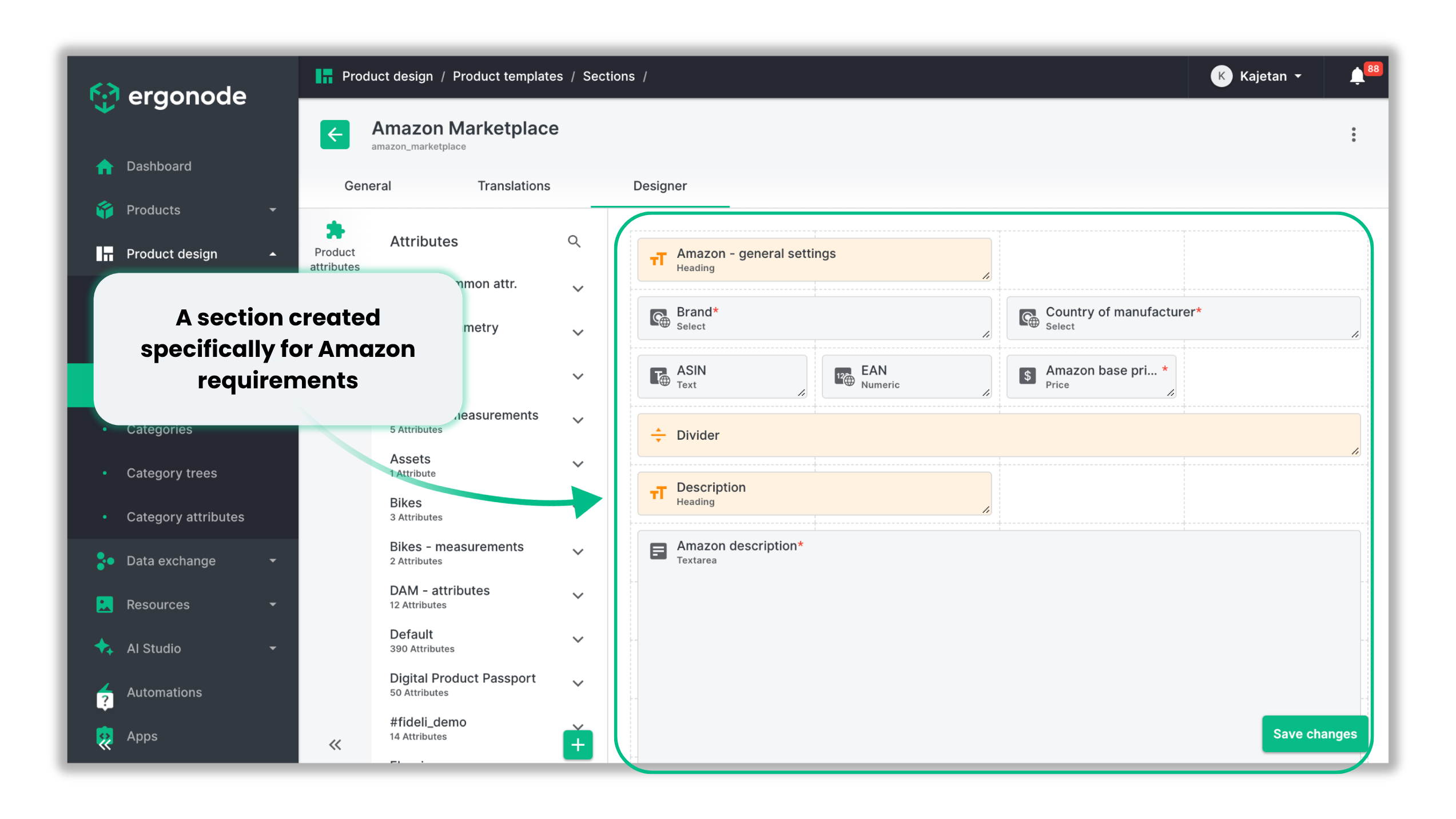
6. Leverage product data to build bigger baskets
Black Friday is the perfect time to look beyond the single SKU.
If a customer is buying a camera, they likely need a tripod, a memory card, a spare lens, or a bag.If they are buying a phone—a case, a screen protector, or a charger.If they are picking out furniture—other pieces from the same collection.
However, these recommendations shouldn't rely solely on manually curated lists.
As your catalog grows, the relationships between products become increasingly valuable.
A product can have designated related items, compatible accessories, variants, or bundle components.
This transforms your catalog from a flat list of SKUs into a relational structure. It maps out how products connect, and you can leverage those insights across your storefront, marketplaces, and other sales channels to drive cross-sells and upsells.
7. Prep visual assets you can swap out on the fly
Black Friday, Cyber Monday, and the holidays often require completely different visual merchandising for the exact same product.
A standard packshot might be fine for your everyday storefront, but a campaign might call for an alternate angle, a promotional overlay, or a seasonal lifestyle shot.
This doesn't necessarily mean you have to book a new photo shoot.
You should treat your visual assets the same way you treat your product data: they need to be reusable and easy to swap.
For instance, a single product might need:
- a standard packshot,
- a lifestyle image,
- a Black Friday graphic,
- a holiday-themed asset,
- a marketplace-specific crop.
In Ergonode, you can leverage the AI Photo Studio to generate new asset variants based on your existing imagery. Everything is stored in one place - within the DAM module - so you aren't hunting through shared folders somewhere else.
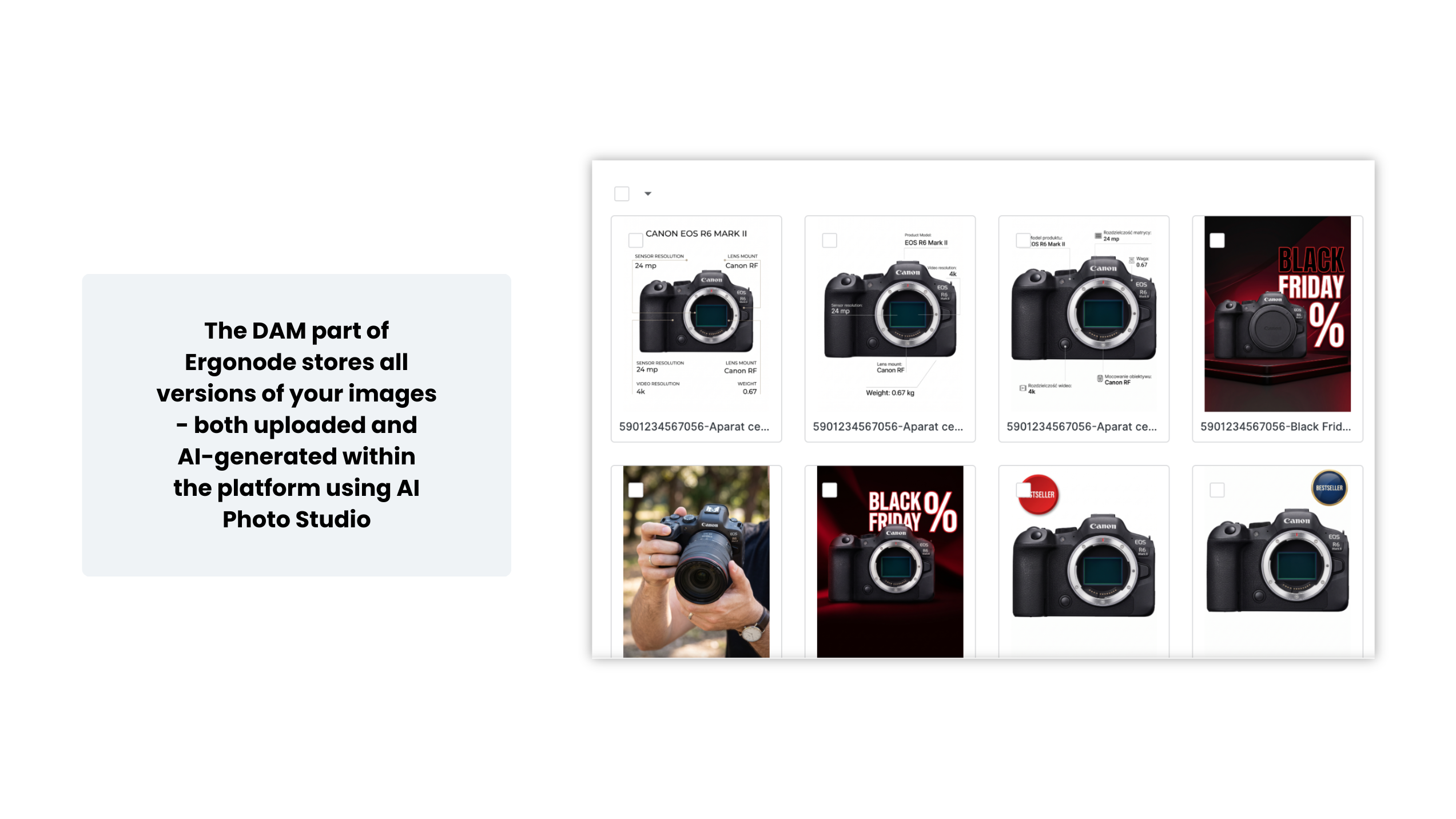
Because of this, prepping your catalog for the next campaign doesn't have to mean starting the whole process from scratch.
8. Prep your catalog for Black Friday (but not ONLY for Black Friday)
This is arguably the most important rule.
Don't build your catalog explicitly for a single campaign.
Black Friday will blink into Cyber Monday. Then come the holidays, end-of-year clearance sales, fresh collections, and a never-ending cycle of retail events.
If every campaign forces you to build new structures, hand-pick products, and repeat the same grueling manual tasks, the headache will return every single time.
On the flip side, if you have:
- organized attributes,
- complete data,
- accurate variants,
- product relationships,
- segments,
- automated rules,
- channel-specific data,
...then your next campaign is just another application of your existing structure.
This is where the true value of a well-architected catalog shines.
It’s not about being ready for one specific day.It’s about being ready for change.
Black Friday as the ultimate test of catalog flexibility
Black Friday doesn't demand a magical data structure.
It requires something far more practical: the ability to pivot your catalog at a moment's notice.
That’s why you should evaluate your data readiness across four dimensions:
- Completeness: Do we have all the information needed to sell?
- Correctness: Is the information accurate and up-to-date?
- Consistency: Is the product presented properly across all channels?
- Flexibility: Can we quickly edit, approve, and publish data?
That last element is incredibly easy to overlook.
You can have a flawlessly complete and correct catalog, but if tweaking the specs on 2,000 products takes several days of manual work, it’s virtually useless in a dynamic retail environment.
A great catalog doesn't just store information. It lets you work with it efficiently.
See how to prep your catalog in practice
We’ve outlined the mindset you need to prep your catalog for Black Friday. But a lot of this heavy lifting can be done directly inside a PIM system.
In our video, we walk you through a hands-on example of how to:
- spot products that need extra attention,
- audit data completeness,
- bulk-edit product information,
- tailor data for different channels,
- build a dedicated Black Friday product feed.
Watch the video and walk through the entire process with us.
Don’t prep your catalog for just one day
Black Friday is just one of many moments where ecommerce teams have to react at lightning speed.
The exact same data structure can power your Cyber Monday sales, holiday promos, clearance events, or the launch of a brand-new sales channel.
So, instead of asking:"How do I prep my catalog for Black Friday?"
You should ask yourself a better question:"Does my catalog allow me to quickly adapt to the next big change?"
If the answer is "no," the campaign probably isn't your real problem. The problem is how your catalog is built.
And a well-designed PIM gives you the one thing you actually need: flexibility.