Meet AI Photo Studio: A New Chapter for Product Content in Ergonode
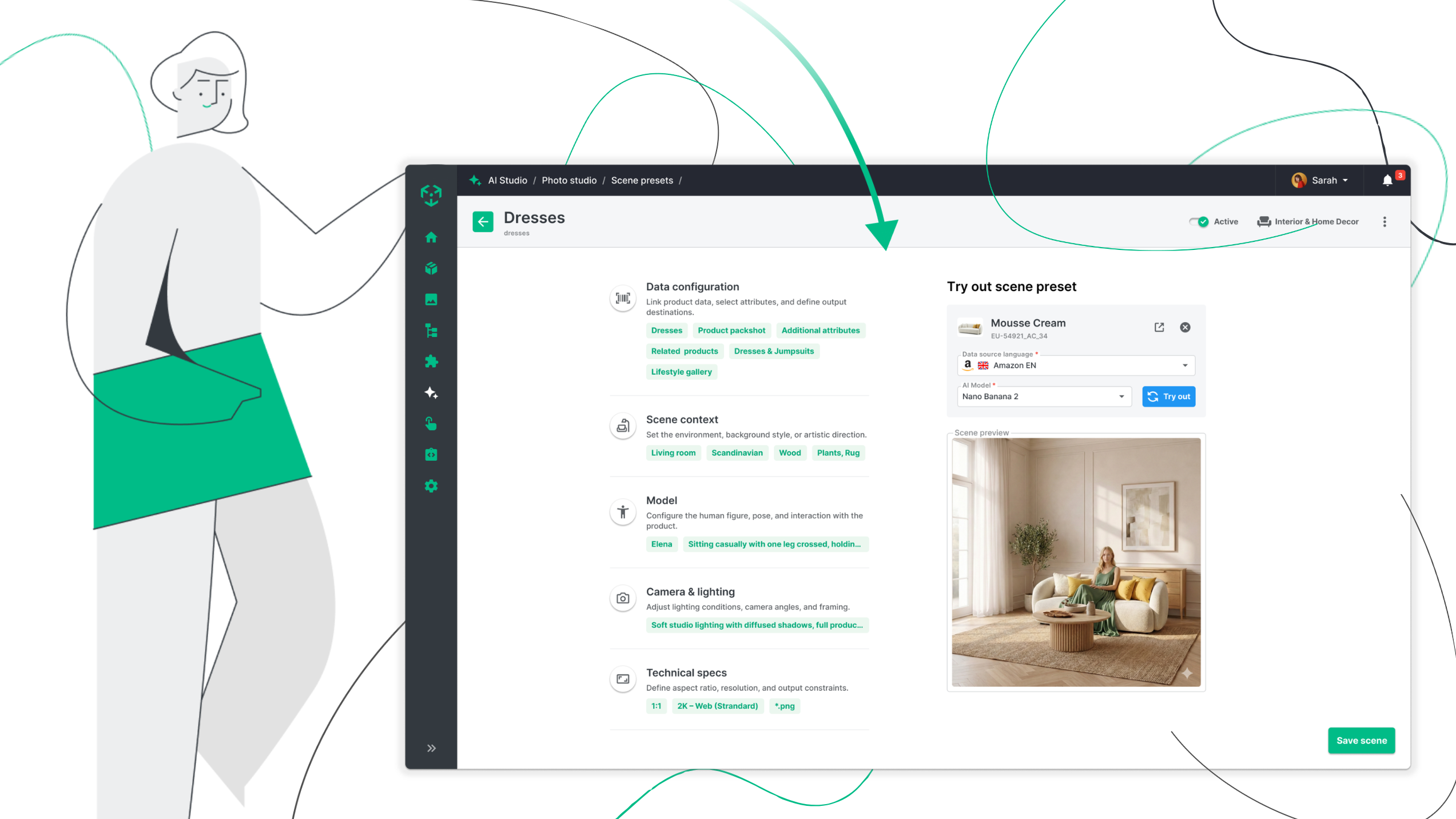
We're excited to introduce one of the biggest updates in Ergonode to date. AI Photo Studio is now available for all customers, bringing AI-powered product image generation directly into your PIM.
Until now, Ergonode has helped teams create, enrich and manage product information, while our recently introduced DAM made it easier to organize and distribute digital assets. With AI Photo Studio, Ergonode takes the next step in expanding the work around product assets.
You can now create new product images, manage them alongside your existing assets, and connect everything to your product data – all in one platform.
This all-AI release also introduces several important improvements to our capabilities, including:
- AI Photo Studio is now available in Ergonode
- AI-generated images integrate directly with DAM
- AI Credits for all AI-powered actions
- AI model selection for supported features
- Prompt support and multiple target languages for AI translations
- Enhanced AI Complete with confidence threshold and model selection
AI Photo Studio is now available
AI Photo Studio allows you to generate professional-quality product images from a single packshot. By combining both models and scenes, you can create lifestyle photography, studio images and campaign visuals in just a few minutes—without leaving Ergonode.
Whether you're preparing images for an online store, a seasonal campaign or a product launch, AI Photo Studio gives your team a fast and intuitive way to create visual content at scale. You don't need any design experience—simply describe the result you want to achieve, and AI takes care of the rest.
With a few prompts, you can create an image like this:
.jpeg)
Step #1: Create your own AI Models
The first step is creating an AI Model—a digital avatar that will appear in your generated product images.
You have full control over the model's appearance. You define general characteristics such as body type, hairstyle or skin complexion, then refine the details with distinctive features like tattoos, accessories or other visual traits. However, if you sell products for pets or other animals - like food, toys or horse riding accessories - your AI models any kind of animal. The setup is up to you.
.png)
Step #2: Design the perfect scene
Once your AI Model is ready, it's time to create the environment where your products will appear.
AI Scenes define the overall look and atmosphere of your generated images. They can recreate realistic interiors, outdoor environments or clean studio settings, depending on the story you want your products to tell.
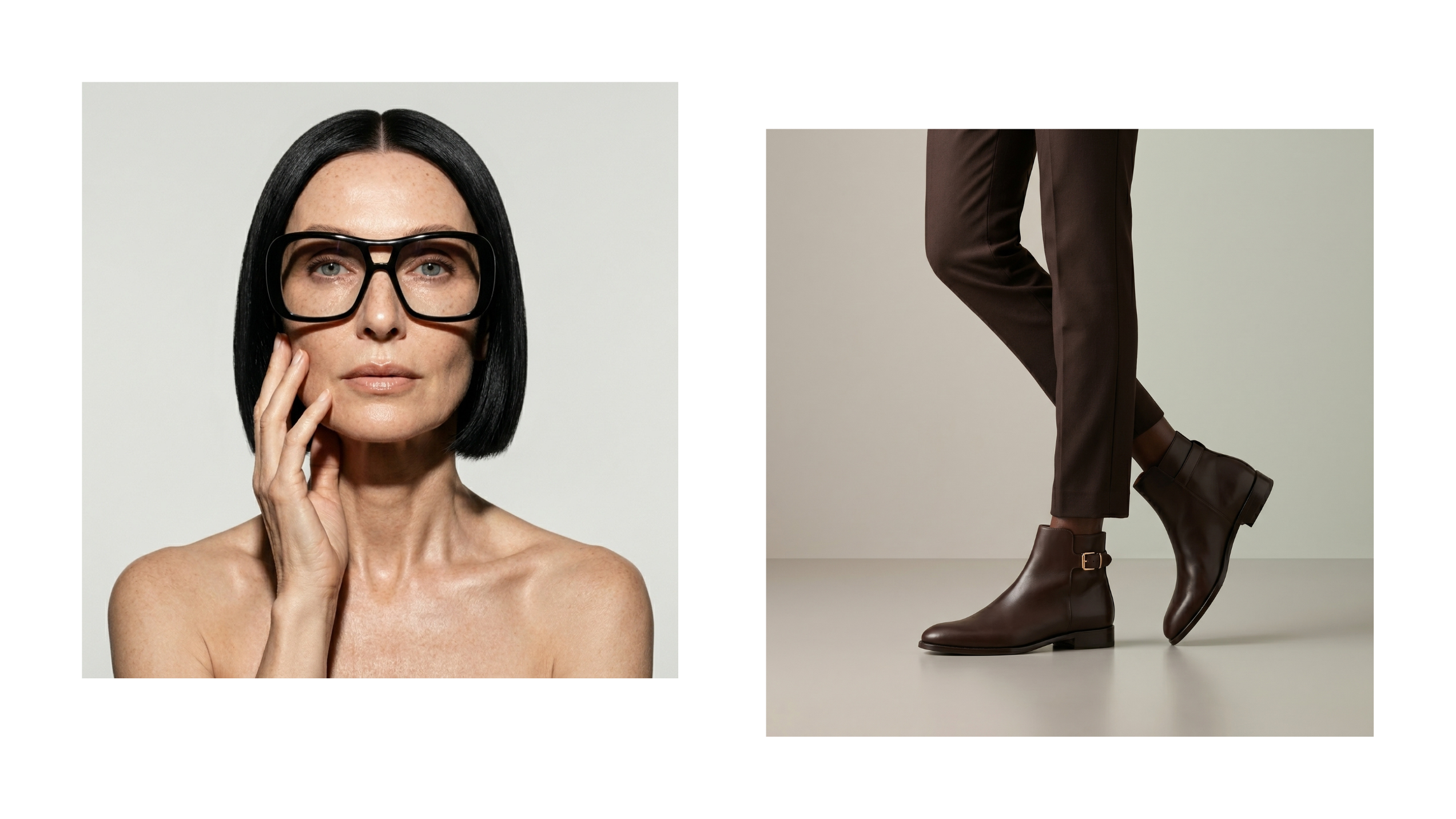
The scene configuration gives you plenty of creative control. Adjust lighting, camera composition, positioning of the AI Model, overall mood and other visual details to achieve exactly the effect you're looking for. You can create scenes that have a studio vibe, like these:
Or create a series of lifestyle images that show off the product in any environment - like a dynamic scene of a runner going for a morning jog or someone hiking in the misty mountains.
.png)
This flexibility makes it easy to adapt your visuals to different product categories, campaigns or brand guidelines without starting from scratch every time. Later on, you will see an example of prompts and the result - a generated image.
Your benefit: from packshot to campaign-ready visuals in minutes
With both your AI Model and Scene prepared, generating new product images becomes a matter of minutes.
The result is much more than a simple background replacement. AI Photo Studio helps create images that look like they came from a professional photoshoot while giving your team complete creative control over the final result.
For many businesses, this opens entirely new possibilities.
Instead of organizing expensive photoshoots every time you launch a new collection, introduce a new product variant or prepare a seasonal campaign, your team can generate high-quality visuals on demand. Testing different concepts becomes easier, updating outdated images takes minutes instead of days, and creating appealing assets for products that rarely receive dedicated marketing attention suddenly becomes economically viable.
This is especially valuable for the long tail of your product catalog. Think of the Pareto principle. While bestselling products often receive the most attention, the remaining 80% of the catalog frequently relies on basic packshots, without any other content to boost sales. AI Photo Studio makes it practical to enrich those products with engaging lifestyle imagery, helping customers better understand the product and strengthening the overall shopping experience.
Ultimately, better product presentation leads to more engaging product pages—and product images remain one of the most influential elements in online purchasing decisions. In the video below, we explain the process in more detail - take a look.
Seamless configuration: How AI Photo Studio fits into media management in PIM
If you've already explored the new DAM capabilities introduced in our previous release, AI Photo Studio will feel like a natural extension of your workflow.
Every generated image can be automatically saved to a folder of your choice, making it immediately available alongside your existing digital assets.
.png)
From there, you can continue working with the files just like any other media stored in Ergonode. Add attributes such as image type (for example, lifestyle image or detailed photo), assign usage information, organize assets into folders and process them using Media Profiles for different channels and marketplaces.
Read about the previous DAM release.
Instead of moving files between separate AI tools, cloud drives and DAM solutions, the entire workflow—from product information to image generation and asset management—takes place inside Ergonode.
Case study: Creating product assets for a heater
AI Photo Studio isn't limited to visually striking products like fashion. Even highly technical products, which aren’t easy to showcase, can benefit from richer, more informative imagery.
Let's take a heater as an example. We created an image of a product using an AI model outside of Ergonode, and then created various versions of the product image using AI Photo Studio. Here are the results.
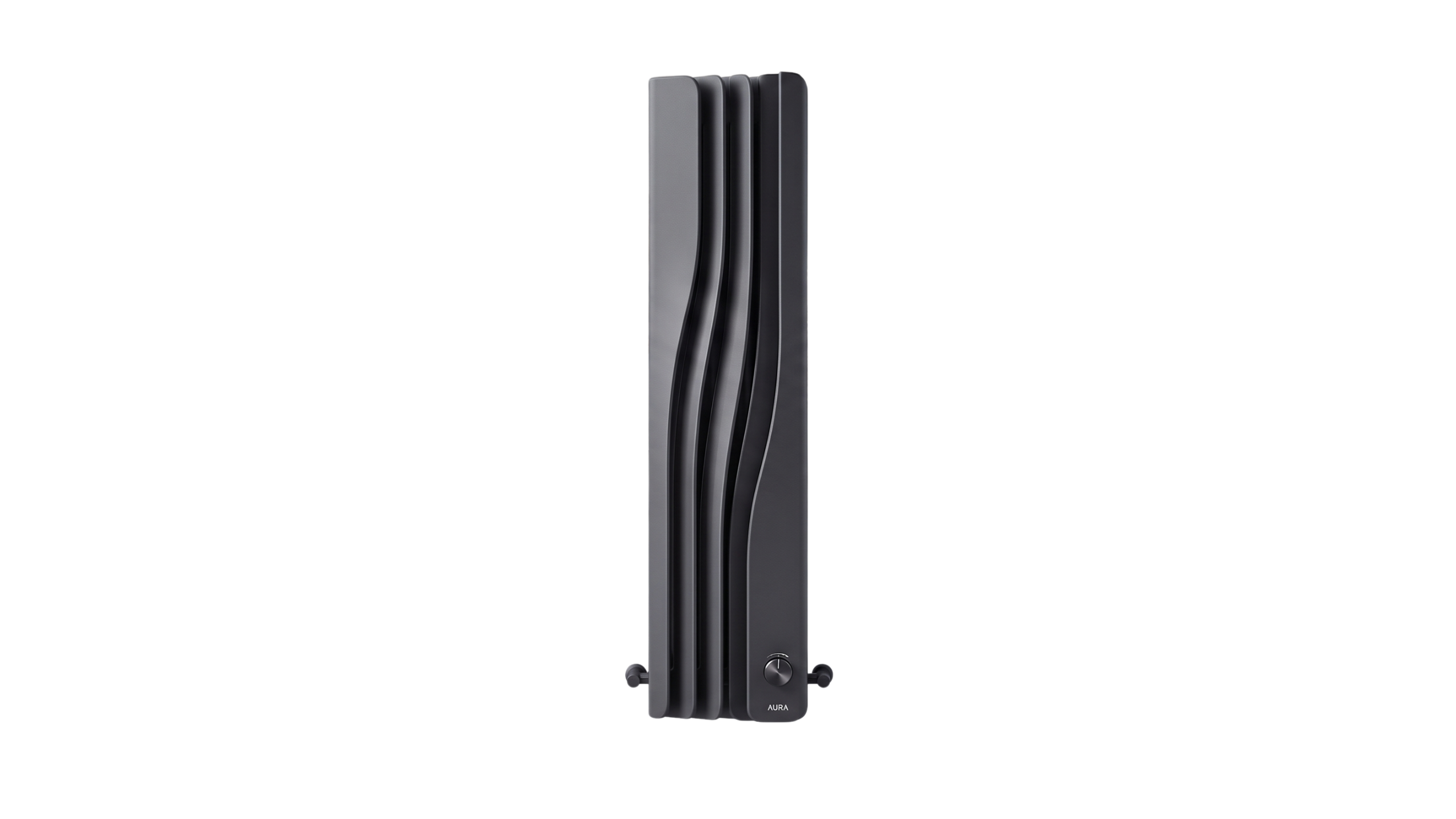
Traditional product photography for this type of product can be challenging. A heater needs to be properly mounted, photographed in a furnished interior and often requires multiple image variants to communicate dimensions, installation or everyday use. Customers also expect to understand the sizing, and it might be useful to point that out in images.
With AI Photo Studio, we generated different visuals for the same product, focusing on a variety of aspects.
We created an image showcasing the sizes first.
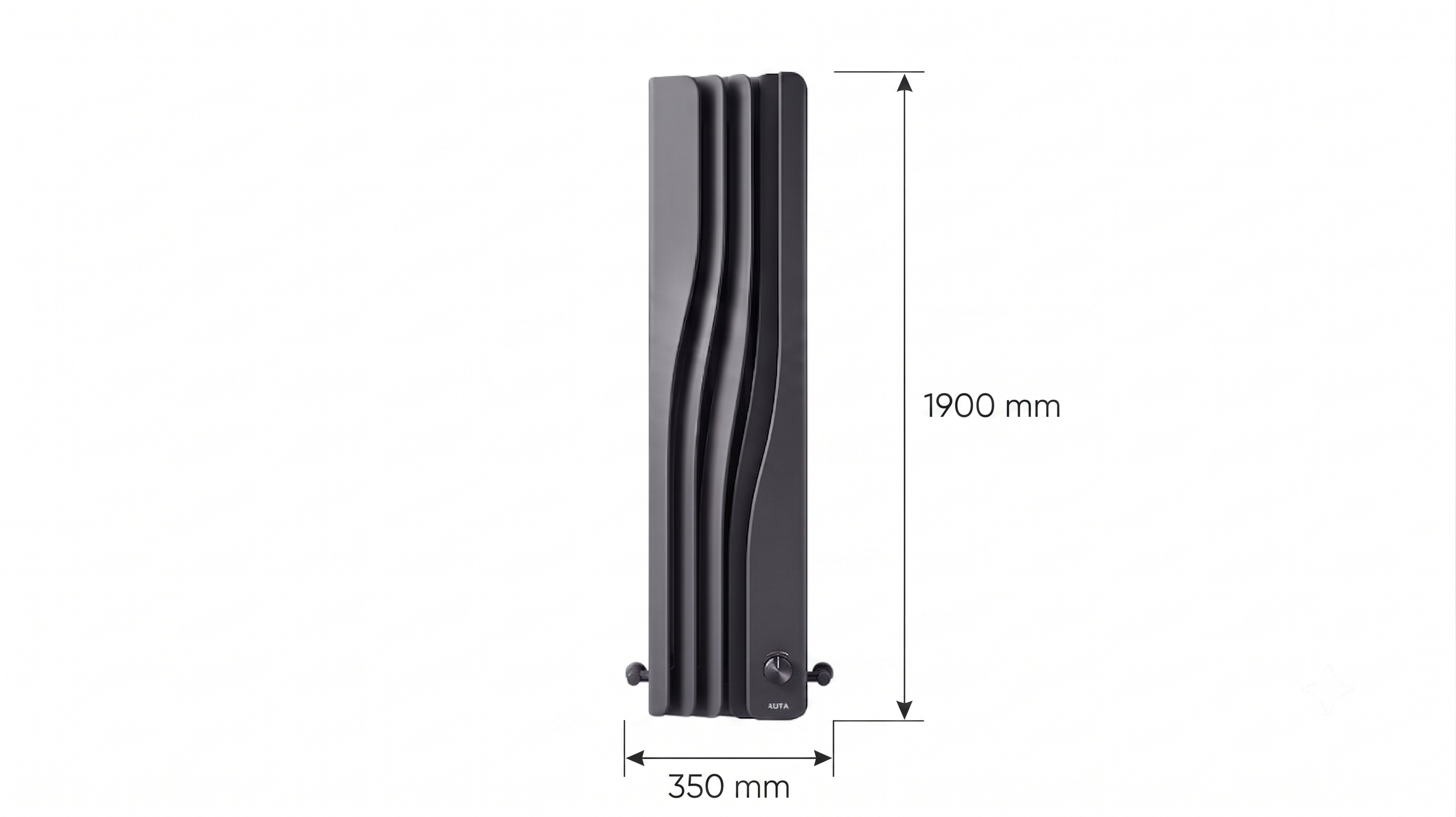
Okay, now we’re moving to the fun part. Buyers often want to see the product in a “real” setting, because it helps visualize how it may look in their own plan. Here, we generated an image where our AURA radiator is mounted on a wall, in a specific setting.
First, review the prompts we used.
Scene context: An artisanal, open-plan combined living and dining sanctuary designed with an earthy, textured wabi-sabi vibe. The walls feature a hand-troweled, mottled earth-tone plaster texture, while the floor is wide-plank, dark-stained rustic wood. A modular, coarse-weave linen sectional sofa in a warm taupe sits on a large, textured jute rug. The dining area includes a robust, dark-wood rustic table and chairs with woven rush seats. The far back wall displays a complex of organic, built-in plaster niches filled with curated antique books, unglazed terracotta vessels, and sculptural ceramics. Two large, black-framed casement multi-pane windows are on the far right wall. Plant life includes a potted olive tree near the sofa and a large fiddle-leaf fig in a concrete pot by the windows. Two large framed abstract artworks featuring geometric gold-leaf shapes against white backdrops hang in the dining area. The left foreground wall section is left open and textured, specifically designated as the product placement area.
Lighting & framing: Intense, warm, directional golden hour sunlight pours dramatically from the large windows on the far right. This light rakes across the textured plaster walls, highlighting their imperfection and casting long, defined shadows from the plants, furniture, and windows across the room. The entire space is bathed in a warm golden-amber hue. The framing is a wide-to-medium establishing shot at a stable, eye-level perspective. The camera is positioned looking slightly off-axis from the right side of the room across the living area towards the far-left wall, using the dark floor planks as leading lines. The composition balances the product zone on the left, the curated niches in the center, and the dining table with windows on the right, all in sharp, clear focus.
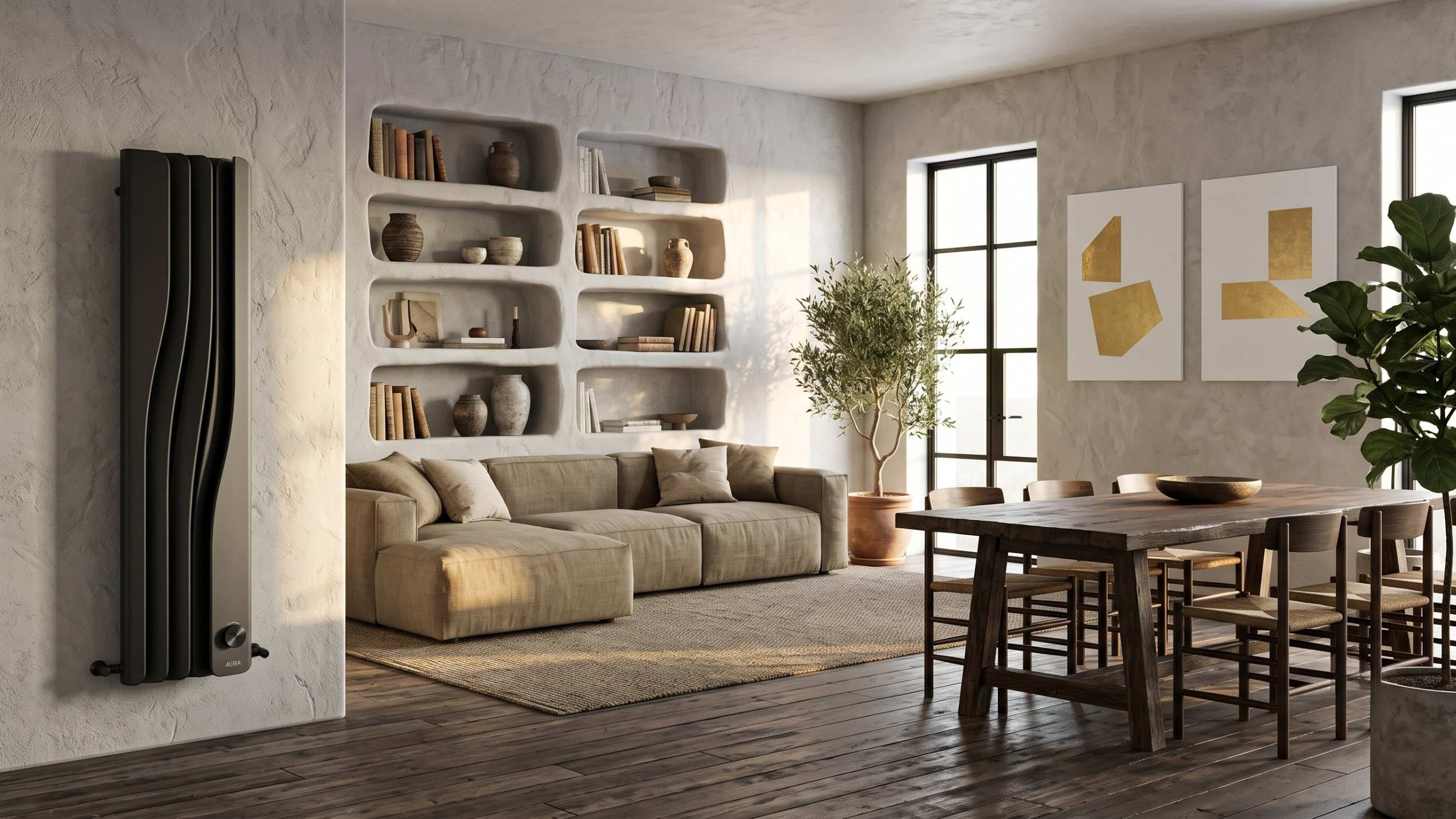
The image above has a distinct interior design, and resembles an actual photoshoot scenery.
We also want to showcase specific elements of the radiator, so we created a detailed shot of the bottom part, with focus on the valves and turning handle.
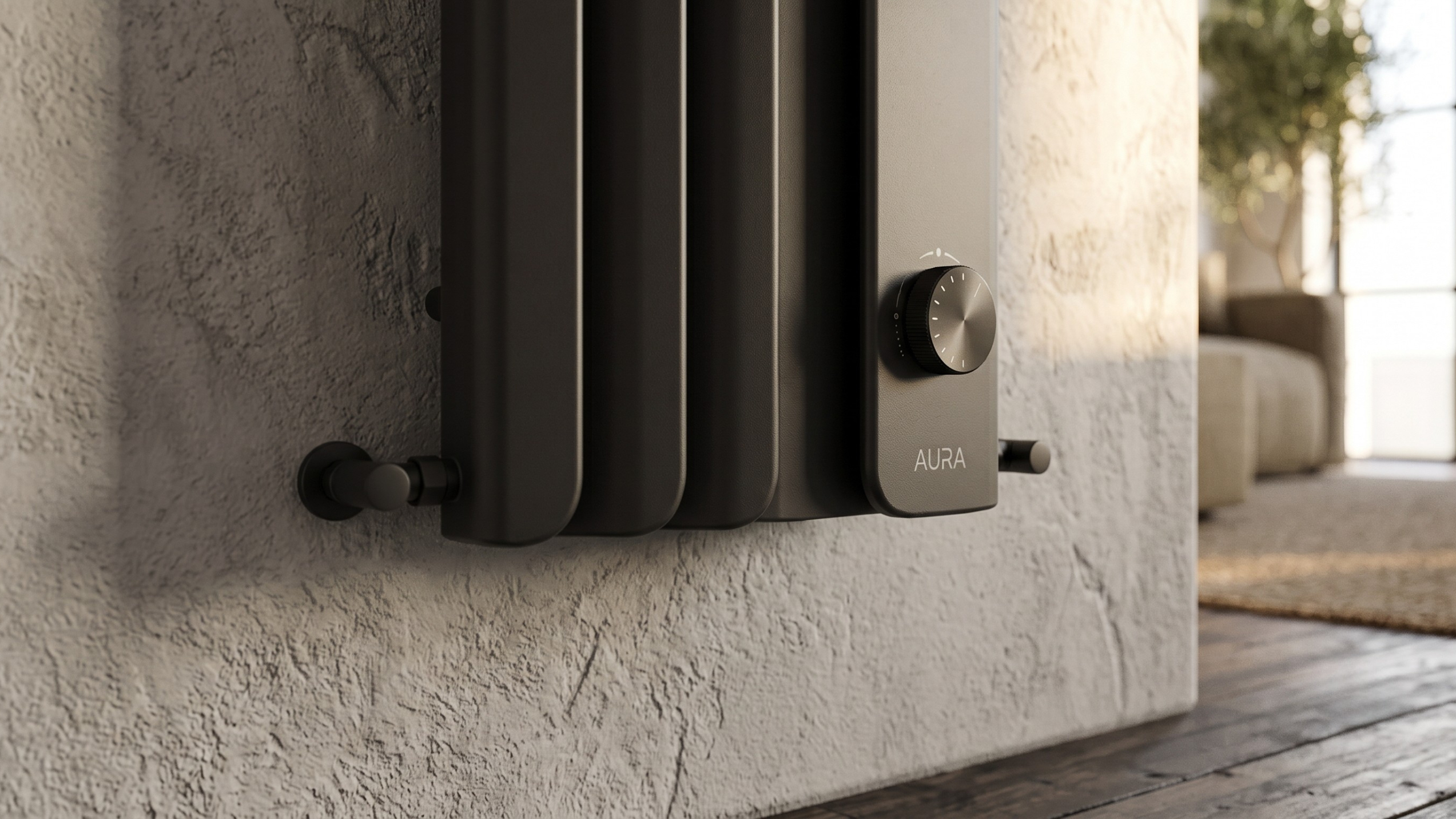
These examples demonstrate how AI Photo Studio helps transform even the most technical products into compelling visual stories—without the time, logistics and costs associated with traditional photography.
Other improvements in this release
While AI Photo Studio is the headline feature, this release also brings several important improvements across Ergonode's AI capabilities.
AI Credits
As our AI functionalities continue to grow, we're introducing AI Credits—a transparent way to manage AI usage across the platform.
Each AI-powered action, including image generation, translations, product completion and other AI features, is associated with a specific credit cost. Whenever you launch an AI action, you'll see exactly how many credits it requires before starting the process.
Credits are provided as a monthly allowance and can also be purchased separately when needed.
For more information about available plans, visit our Pricing page.
Choose the AI model that fits your needs
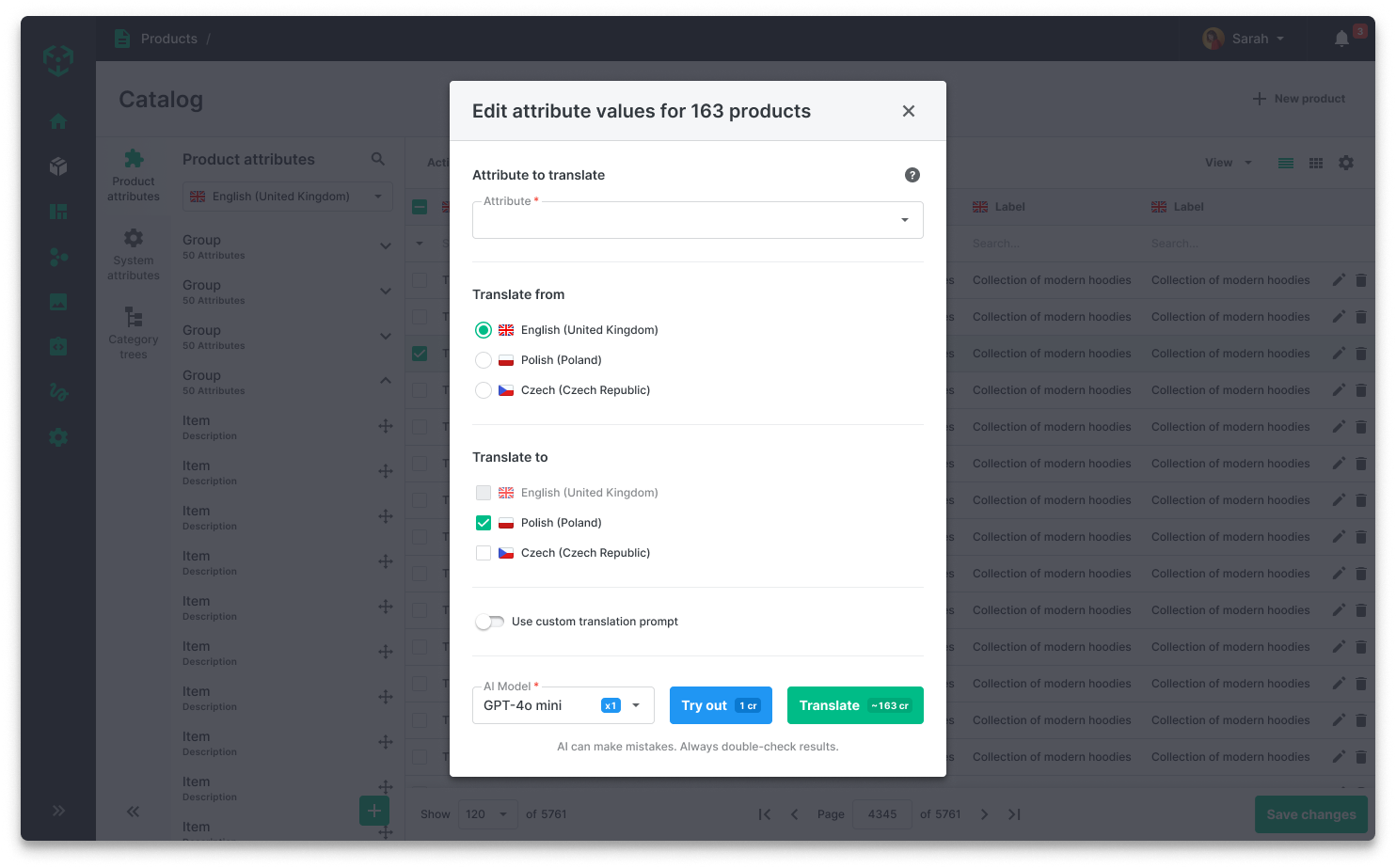
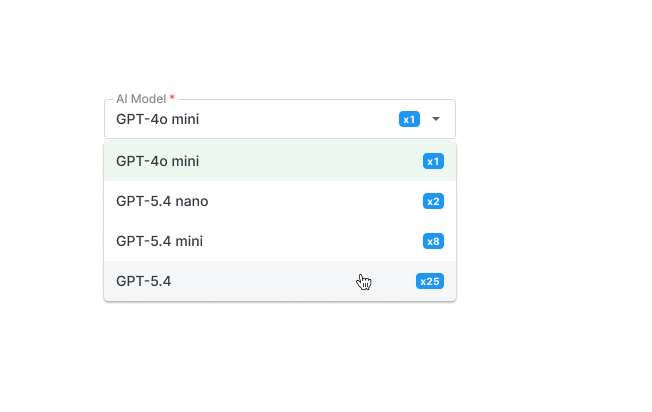
You can now decide which AI model should power supported AI actions in Ergonode.
Different models offer different balances between quality, speed and credit consumption, giving you greater control over both results and AI usage costs.
As a general rule, more advanced models consume more credits but may produce higher-quality outputs. The choice is entirely yours.
More control over AI translations
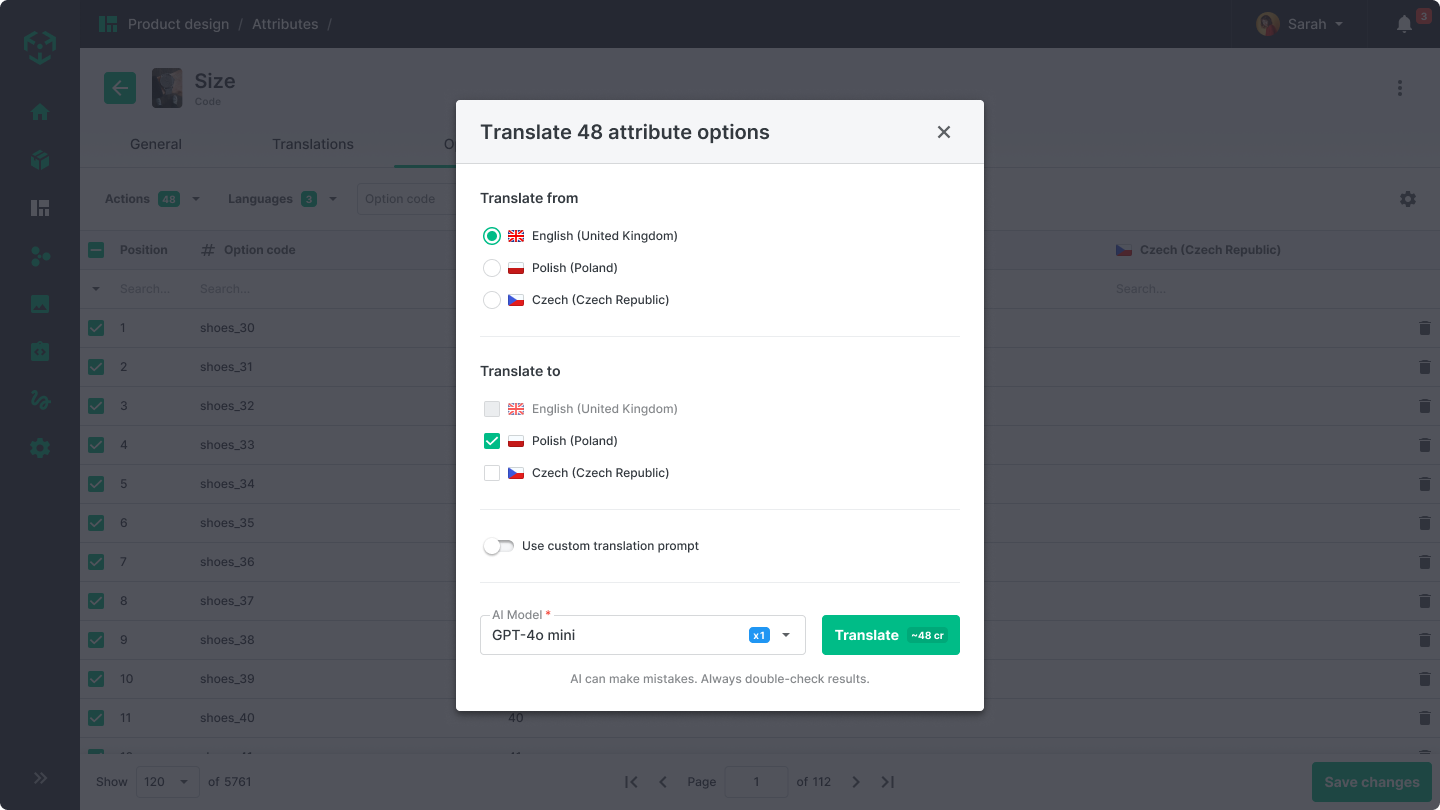
AI-powered translations become more flexible with the introduction of custom prompts.
You can now provide additional instructions that help AI better understand your content, preferred terminology or brand language. This is especially useful when working with product-specific vocabulary or maintaining consistency across multiple markets.
To make large localization projects even easier, you can also translate one source language into multiple target languages in a single action.
AI Complete gets even smarter
One of Ergonode's most popular AI features—AI Complete—has also received an important upgrade.
You can now choose the AI model used for product completion and define a confidence threshold for generated values.
.png)
This is particularly useful when completing complex attributes with many possible values. Instead of making uncertain suggestions, AI can leave attributes incomplete whenever the confidence level is not met.
This gives your team greater control over data quality while reducing the risk of incorrect product information entering your catalog.
Over to you
AI Photo Studio introduces a completely new way of creating product content, allowing you to generate professional product imagery directly inside your PIM. Combined with DAM, product information management and our expanding AI capabilities, Ergonode now supports an even larger part of the product content lifecycle within a single platform.
Alongside AI Photo Studio, this release brings greater flexibility to AI translations, more control over AI-powered product completion, transparent AI Credits and the ability to choose the AI models that best fit your needs.
We can't wait to see what you'll create with these new capabilities - share them on social media with a hashtag #ErgoAIPhotoStudio and let’s see those products in a new light!
Other insights