
How to Buy PIM Software

How to buy PIM software without buying the wrong one
Product data scattered across spreadsheets. Inconsistent descriptions across channels. A shortlist of vendors that all sound the same. This guide walks you through exactly how to evaluate, compare, and choose the right Product Information Management system — step by step.

"Buyers have access to an abundance of options at their fingertips. They are also more informed and want clear, accurate, and consistent product information wherever they shop." — From the introduction, "How to Buy PIM Software"
Four parts, one buying decision
The guide follows the same order a real PIM purchase does — from recognizing the problem to signing the contract — so you can pick it up at whichever stage you're at.
Introduction
Why accurate, consistent product information has become non-negotiable for retailers, brands, and e-commerce stores of every size.
Understanding Product Information Management
What a PIM actually is, why it matters, when it's the right time to invest, and exactly who in your organization needs a seat at the table.
Key considerations in PIM selection
The core of the guide: understanding your needs, checking features, sizing up vendors, running demos, and finalizing the decision.
Conclusion + Bonus checklist
A closing summary — and a printable PIM Selection Checklist covering every area from platform architecture to implementation cost.
What a PIM actually does with your product data
"Product Information Management (PIM) is a system that helps businesses organize and manage all the details about their products in one central location" — a single hub for descriptions, specifications, images, and more.
Through a PIM, that information gets pushed out to every sales channel at once: your website, marketplaces, and your ecommerce store — all fed from the same source of truth.
- Attributes & units — structured specs instead of scattered spreadsheet columns
- Photos & categorization — assets and taxonomy live next to the product, not in a separate folder
- Translations & accessories — everything needed to enrich a listing for a new market or channel
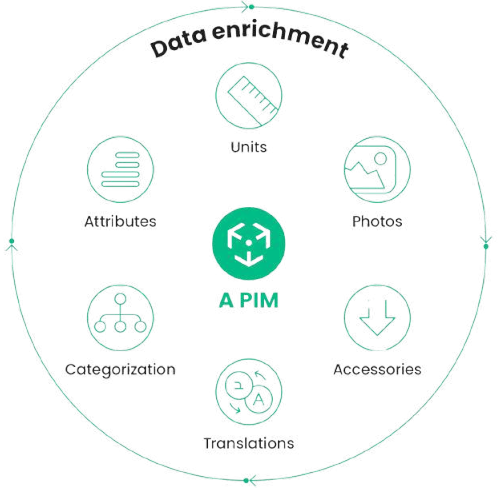
Four reasons the e-book gives for why this isn't optional anymore
Ends data fragmentation
Replaces scattered spreadsheets and legacy systems with one unified, accurate, and accessible source of product truth.
Enables personalization
Enrich products with attributes, images, and video so listings meet today's demand for relevant, tailored experiences.
Improves SEO & visibility
Rich, structured product content drives organic traffic and conversions across every channel it touches.
Streamlines workflows
Cuts manual, repetitive work and shortens time-to-market for new product launches and updates.
.jpeg)
When is it actually the right time to buy?
The guide lays out the signals rather than a hard rule — because the "right time" looks different for every merchant:
- Growing product complexity and volume — your catalog has outgrown spreadsheets and one-off systems.
- Multi-channel selling and global expansion — you need to manage languages, currencies, and regulatory requirements at once.
- Inconsistent or inaccurate product data — conflicting information across platforms is already hurting the customer experience.
- Inefficient workflows & collaboration — teams are stuck in communication gaps instead of a shared, trackable process.
The e-book maps every stakeholder in a PIM buying process
A purchase this cross-functional needs buy-in from more than one department. Here's who the guide says belongs at the table — and why.
.jpeg)
"While the final purchase decision may rest with a select few, the buying process itself should consider both departmental and organizational needs."
Decision makers
C-suite executives who sign off on the strategic value of a PIM system to overall business efficiency.
Budget owners
Finance weighs the return on investment and approves the financial side of the project.
End users
Marketing creates and manages product content; sales relies on it being accurate enough to close deals.
IT department
Evaluates technical fit, integrations, security protocols, and ongoing maintenance.
Customer service
Surfaces the customer pain points around product data that should shape the final selection.
All five, aligned
The guide's point isn't that one department decides — it's that the process only works when all five weigh in before the contract is signed.
Six areas the guide tells you to check before you sign anything
Once you know your own needs, the e-book breaks feature evaluation down into six concrete areas — each with the specific questions to ask a vendor.
Platform type
Cloud-based SaaS vs. on-premise — weighing scalability and cost against data control and customization.
Data management
A centralized repository, intuitive editing, and version control so revisions never get lost.
Digital Asset Management
Store, organize, tag, and reuse product images and video from the same platform as the data.
.jpeg)
.jpeg)
Workflow management
Roles, permissions, and real-time progress tracking so multiple people can edit in parallel.
Multi-channel support
Tailor and distribute the same product data differently across every sales channel you use.
Integrations
Seamless connections to your e-commerce platform, ERP, marketing automation, and analytics tools.
Choosing a vendor is a separate decision from choosing a feature list
The guide (citing ExpertBeacon's PIM vendor research) lays out five criteria for sizing up who you'll actually be working with for years, not just what their software does on a spec sheet.
.jpeg)
Reputation & track record
Industry recognition and case studies with similar businesses.
Customer reviews
First-hand insight into implementation, support, and satisfaction.
Scalability & flexibility
Modular architecture that grows with your catalog.
Pricing & value
Transparent models, budget fit, and real ROI.
Implementation & support
Responsive experts, plus real training and onboarding.
.jpeg)
Run the demo like an evaluation, not a sales meeting
The guide's advice: define your evaluation criteria up front, share your real product data and use cases with the vendor, bring people from every department that will use the system, and judge the demo specifically on ease of use, data handling, and any gaps that show up.
"Don't hesitate to ask additional questions that arise during the demo" — the guide is direct that this stage exists to surface problems before the contract, not after.
This e-book, filed the way it teaches you to file everything else
Fitting, given the subject: here's "How to Buy PIM Software" laid out exactly like a product record inside a PIM — attributes, tags, and all.
A PIM Selection Checklist you can bring straight into your next vendor call
The final pages hand you a ready-made checklist, organized by area, so nothing gets missed between the first demo and the signed contract.
| General information | |
| Platform type | Cloud, on-premise, or hybrid |
| Architecture | Monolith, Cloud, or MACH |
| Products management | |
| Data model | Create, edit, group attributes & families |
| Multi-channel readiness | Completion level per channel |
| History & revisions | Who changed what, and when |
| Implementation | |
| MVP implementation time | Timeline to first live catalog |
| Maintenance cost | Ongoing vendor cooperation model |
.jpeg)
Book a demo and let's get in touch
You've read what to look for in a PIM. Now see how Ergonode holds up against the checklist — on a real catalog, with a real product specialist.
e-book


