
Mastering Product Catalog Management with Shopify and Ergonode PIM

Your catalog outgrew Shopify.
This is the fix.
18 pages on exactly where Shopify's product-data limits show up — and how Ergonode PIM takes over so your catalog can keep growing without chaos or manual busywork.
.jpeg)
Six chapters, one honest answer: where Shopify stops and PIM begins
No fluff, no generic PIM pitch — just the specific limits, the fixes, and what it costs to ignore them.
Introduction
Shopify is great to start with. But scaling a catalog takes more than a sales engine.
Shopify's strengths & limits
The 7 constraints that quietly cap how far your catalog can scale.
What a PIM actually is
How it differs from Excel, a CMS, and an ERP — and Ergonode's real, working features.
Case studies by industry
Concrete problems and fixes across fashion, beauty & cosmetics, and home & deco.
Apps vs. a system
The hidden cost of "just add another app" — measured against one PIM subscription.
How to implement it well
5 steps to a Shopify integration that doesn't create more chaos than it solves.
7 limits quietly capping your Shopify catalog
Shopify sells brilliantly. It just wasn't built to be the system of record for a large, growing product catalog — and here's exactly where that shows.
Variant & option limits
Max 100 variants and 3 options per product — bigger fashion or cosmetics lines get artificially split, hurting navigation and analytics.
No workflow or quality control
No visibility into what's still in progress, complete, or waiting on approval — and no way to assign that work to a person.
No real bulk actions
Bulk edits, mass attribute updates, and rule-based filtering all mean manual CSV exports and imports.
Manual metafields & metaobjects
No automation rules and no central source of truth for values — every product gets tagged by hand.
No translation tracking
No way to see what's translated and what isn't, and no workflow for managing translators.
Weak filtering & navigation
Can't find "products missing a size chart and a German translation" without an external tool.
App-dependency creep
Every missing feature becomes another app, another cost, another interface your team has to juggle.
What a PIM does that Excel, a CMS, or your ERP can't
Each tool has its place. None of them were built to model, edit, and keep large volumes of product data in order — that's the specific job a PIM does.
| Tool | Optimized for | Limitation |
|---|---|---|
| Shopify | Sales, promotions, frontend, checkout | No workflow, data-management limits |
| Excel / Google Sheets | Speed and flexibility | No automation, workflow, or validation |
| CMS | Marketing content | No product-data support |
| ERP | Finance, logistics, warehousing | No content or data-channel layer |
| Ergonode PIM | Product data, workflow, validation, automation | Not a sales tool — a product-readiness engine |
Real functionality, not just promises
Data & attribute modeling
Your own product structures — families, lines, variants, bundles — with rules for required fields and allowed values.
Bulk editing & filtering
Filter by any criteria and edit hundreds of products at once. No CSV exports, no re-imports.
Workflow & status tracking
Kanban stages — "To describe" → "To verify" → "Ready for publication" — with tasks assigned to the right person.
Translation & versioning
All language versions in one place, with full history, so nothing gets published half-translated.
Product relationships
Bundles, configurators, cross-sell and upsell logic, and conditional attribute assignment.
Automation & Shopify sync
Publish via API or a dedicated feed — only complete, rule-checked products ever reach the store.
.jpeg)
Industry case studies the e-book covers in most detail
Real problems and fixes from the three industries where product data gets the most complicated.
.jpeg)
Seasonality, variants, many markets
- Auto-map proprietary color names to Shopify & marketplace standards
- Auto-assign size charts by brand, category, and gender
.jpeg)
Ingredients, compliance, markets
- Auto-generate warnings from active-ingredient data
- Publication gates so nothing ships without required fields
.jpeg)
Styles, materials, bundles, accessories
- Model variants, bundles, and standalone items separately
- Auto-enrich specs — e.g. wool → "natural, easy to clean"
Apps vs. a system: what "just add another app" really costs
Every missing feature in Shopify tends to get solved with one more app. It's fine at first — then the bill and the busywork both compound.
| Bulk editing (Matrixify / Excelify) | $50–100 |
| Metafields & metaobjects | $30–80 |
| Workflow automation | $50–150 |
| Translation management | $90–400 |
| Validation & data workflow (custom dev) | min. $500–1500 |
Everything above, replaced by a single subscription
- Bulk editing, workflow, and validation built in
- One interface for your whole team, not five
- Faster launches, fewer errors, no app juggling
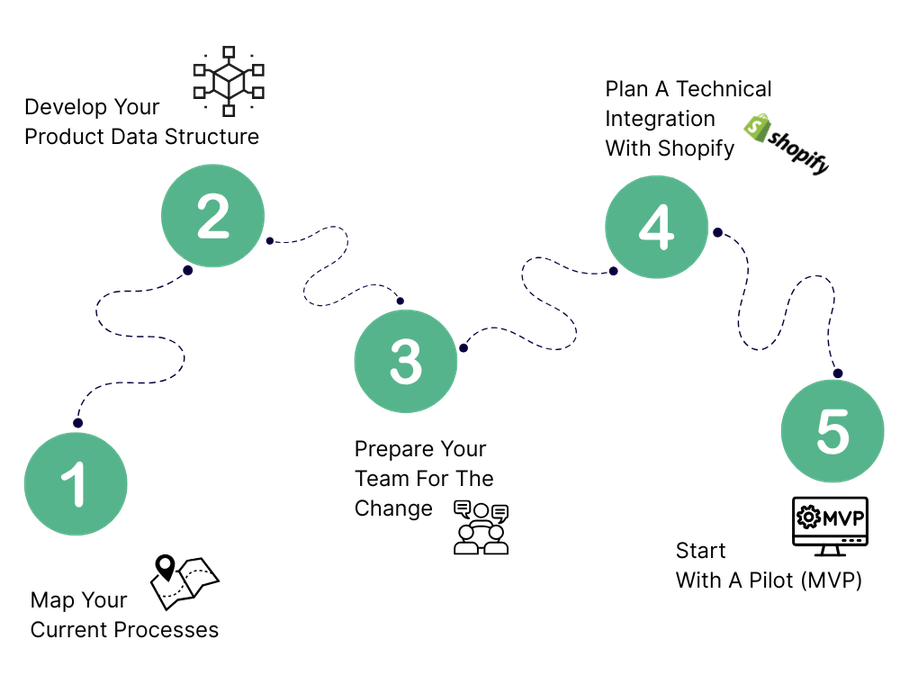
How to roll out a PIM that actually integrates with Shopify
Map your current process
Where product data gets created today, who owns it, and which tools are already in use.
Design your data structure
Decide which attributes matter, which are required, and how variants relate to each other.
Prepare your team
Assign process owners and agree on the rules for moving a product through each stage.
Plan the Shopify integration
Choose a connector, custom API, or iPaaS, and decide how variants and metafields will sync.
Start with a pilot
Run one category or market through the full cycle before scaling to the whole catalog.
Organize your catalog before chaos does it for you
Get the "Shopify + PIM" e-book, or skip straight to a demo and see how Ergonode PIM helps your team work 5× faster and 10× more accurately.
e-book
Free insights and inspiration


