November Product Release: AI Batch Actions, Watermarks & AI Labels
Filling in a new collection used to mean hours of copying, product by product. Now AI can do it for you – on hundreds or thousands of products and images in a single run. And every image you share can now carry your watermark, with a clear label on the ones made by AI.
In this release
- AI batch actions – complete attributes for hundreds of products at once, plus titles and alt text for images,
- Watermarks for any image – with dedicated labels for AI-generated ones,
- A friendlier product card – browse options with custom fields and reorder items with ease,
- Count operators – in automation conditions, plus description length in filters.
Here's what's new 👇
AI batch actions for products and media 🪄
AI Complete used to work one product at a time. Now AI can complete hundreds or thousands of products and images in a single run.
Complete attributes for many products
- Select products in the catalog.
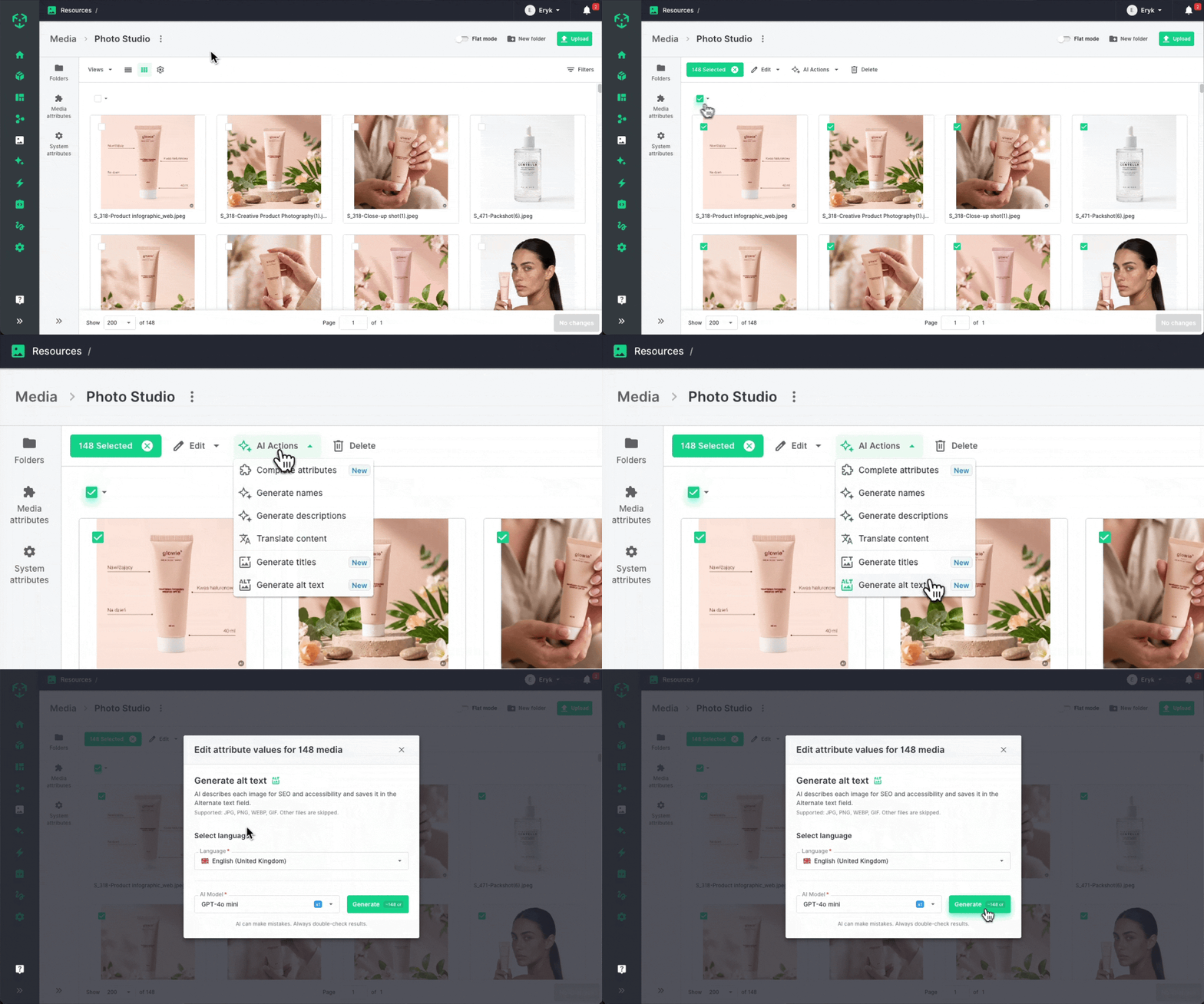
- Open AI actions and choose Complete attributes.
- Pick the attributes to fill, the data AI should use to identify each product (e.g. name, description or image), a language and a model.
Existing values are overwritten – filter for empty values first if you only want to fill the gaps.
Titles, alt text and attributes for images
The media library gets three new AI actions that work straight from the image:
- Complete attributes fills your media attributes,
- Generate titles writes SEO-friendly titles,
- Generate alt text describes each image for search and accessibility.
Available in plans that include AI features; each run uses AI credits.
Where AI saves you hours
- A new collection, ready in one run. Hundreds of fresh products with little more than a name and a photo? Select them all and let AI write descriptions, pick colours, materials and styles from your option lists, and fill in dimensions, weight and care instructions – for every product, in the language you need.
- Every image, described. Thousands of photos and no alt text? One run gives each image a search-friendly title and a description that makes your store more accessible.
- Gaps closed before they cost you. Filter products with empty attributes and let AI complete them before they reach your webshop or marketplace.
Watermarks for every image – and clear labels for AI 🏷️
Put your logo on images you share with partners, discourage unauthorised reuse of your photos, and label AI-generated ones the way customers, marketplaces and regulators increasingly expect. Pick the setup that fits how much control you need.
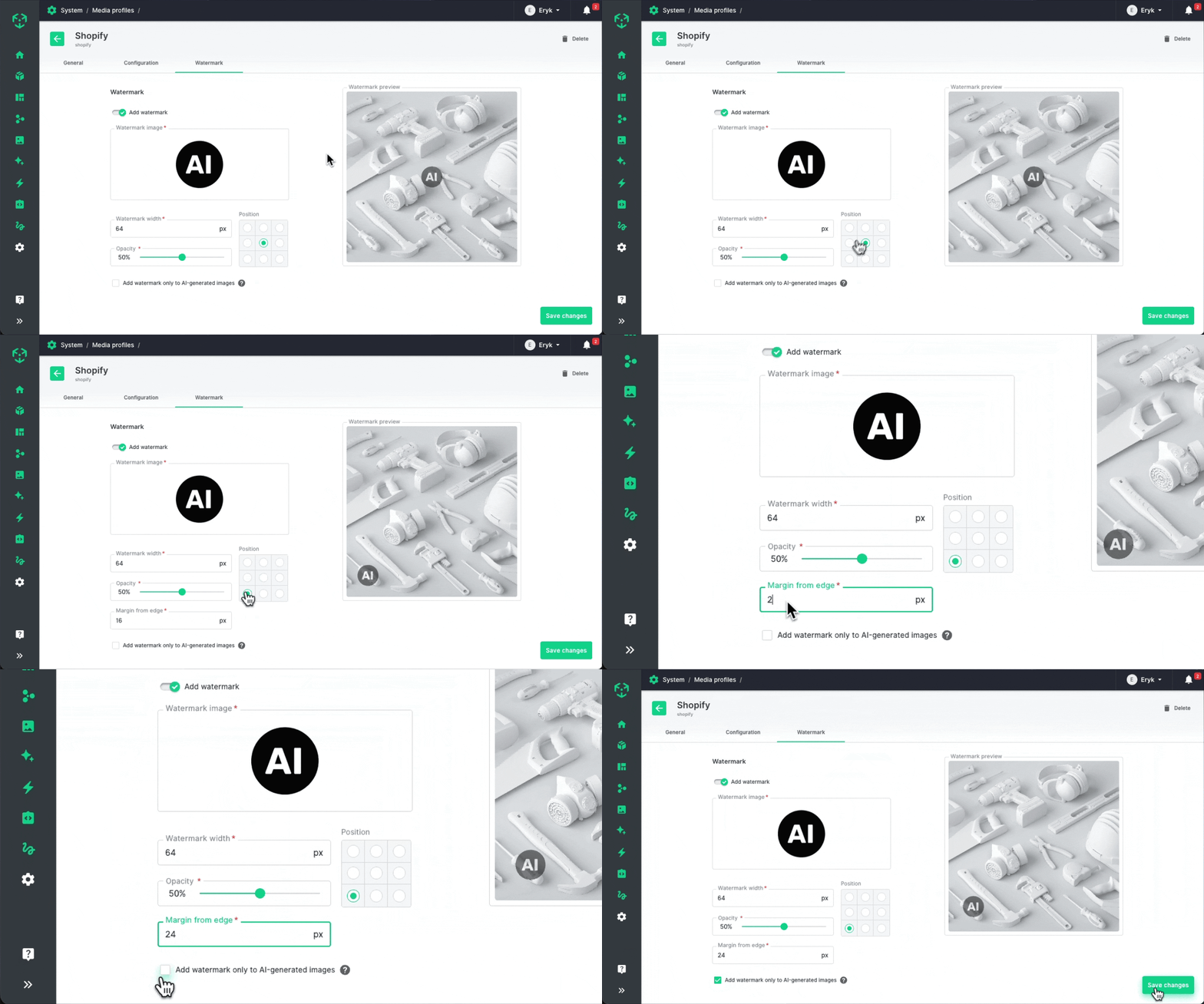
Watermarks in media profiles
- Turn on Add watermark in a media profile.
- Pick any image from the media library – your logo, a badge or an "AI" label.
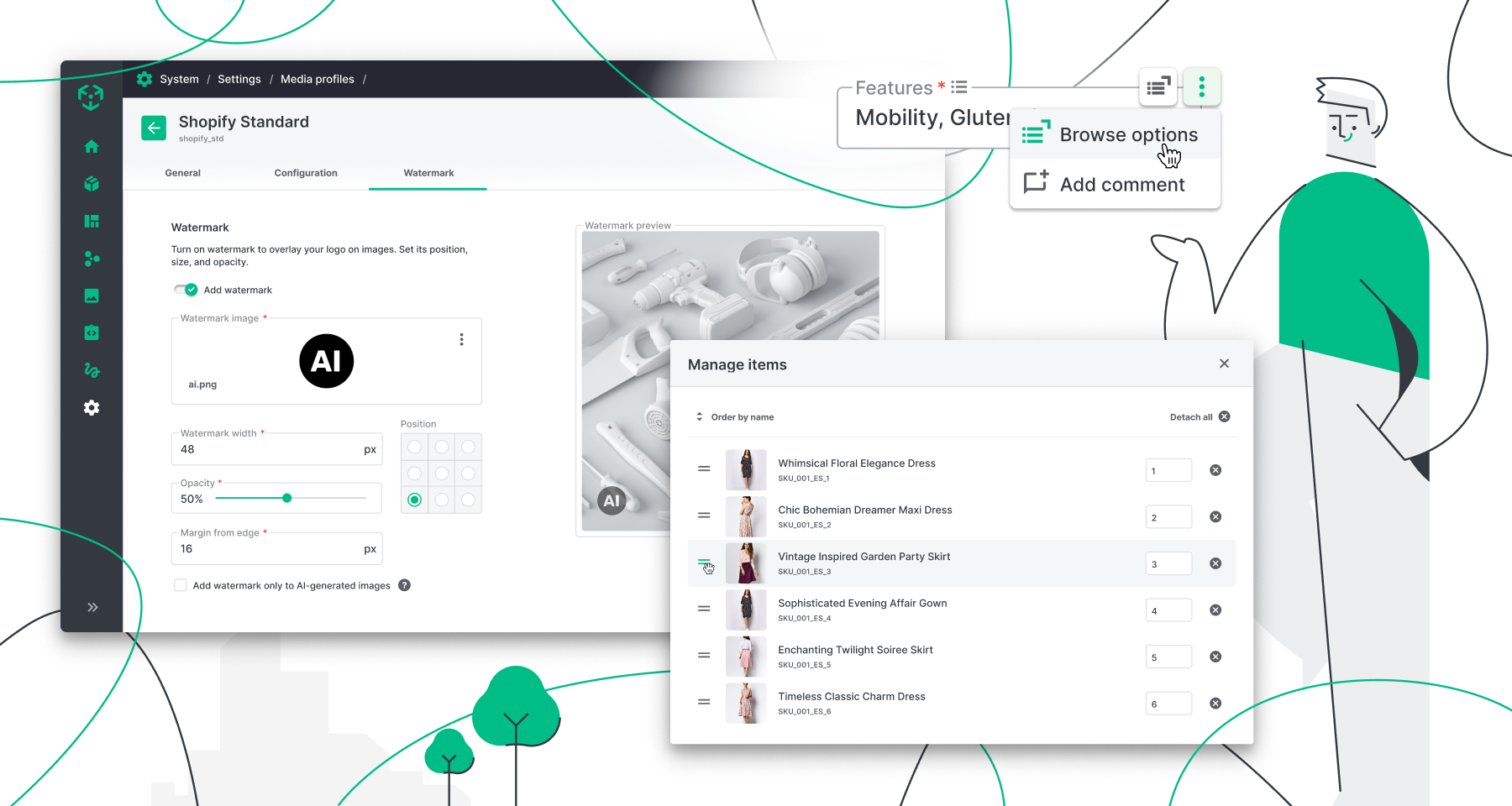
- Set its width, position, opacity and margin, and check the result in the live preview on the new Watermark tab.
The mark is added as images go through the profile, so you can change it at any time. Want it only on AI images? Tick Add watermark only to AI-generated images.
One-click AI mark in AI Photo Studio
No media profiles? Check Add an AI watermark to generated images in a scene's Technical specs. Every image generated with that scene gets the EU "AI" symbol in the corner, saved right in the file.
Know which images are AI-generated
A new AI generated attribute (Yes/No) marks your media. Images from AI Photo Studio get Yes automatically – including those created before this release. For images made elsewhere, set it on the media page or for many files at once with a new batch action, then use it as a grid column or filter.
Your images, labelled and branded
- AI labels, built in. Realistic AI-generated or AI-edited images need a clear label under the EU AI Act. Ergonode helps you add it – with the EU "AI" icon from AI Photo Studio, or your own mark added by a media profile. The label is part of the image, so it stays visible wherever the file goes.
- Only where it belongs. Show AI-generated lifestyle scenes in your store with a clear "AI" mark, while your classic packshots stay perfectly clean.
- Your brand on every shared file. Images sent to distributors and resellers through a media profile carry your logo automatically. No manual editing, no forgotten files.
A friendlier product card 📝
See more and reorder faster – without leaving the product.
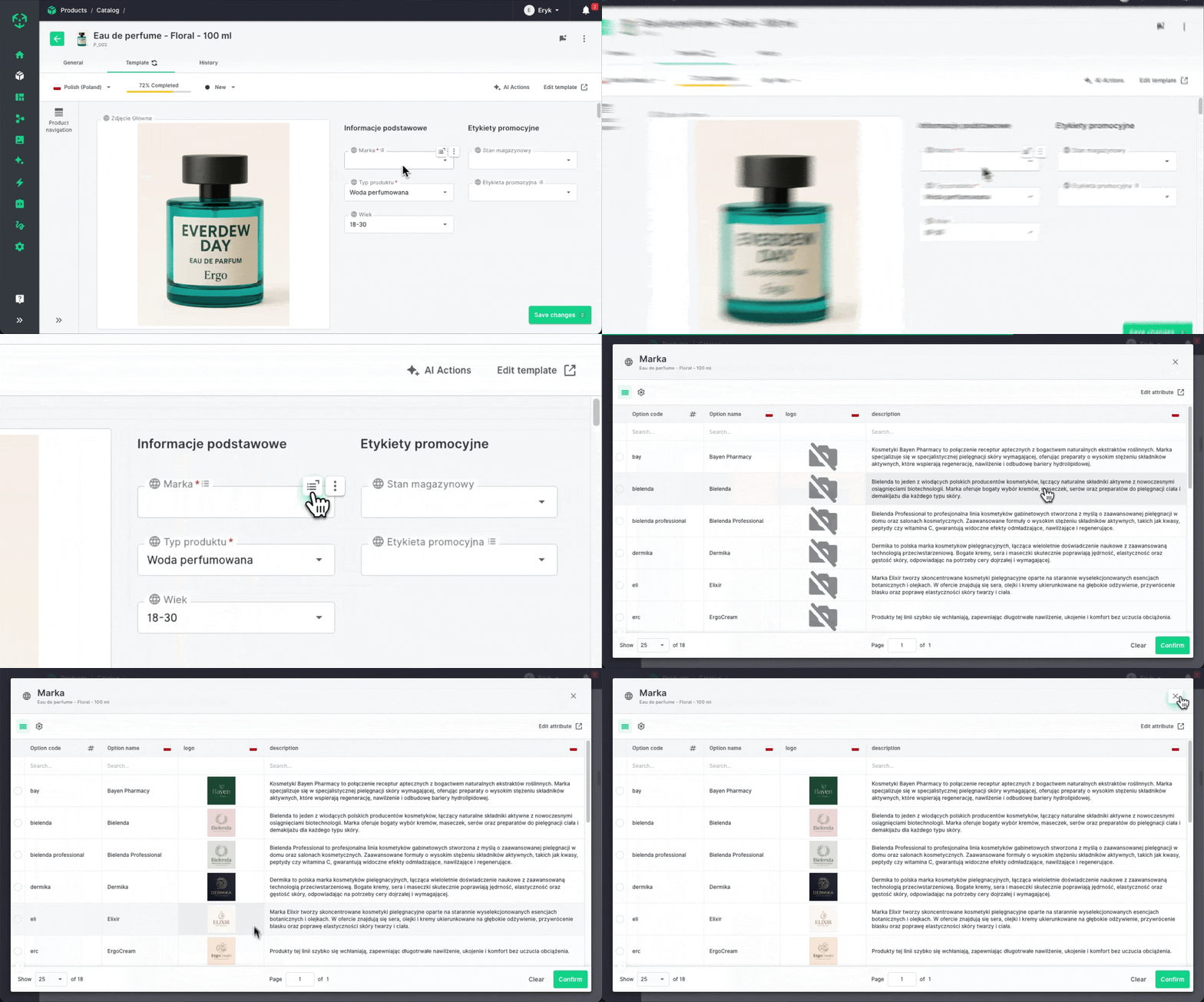
Browse options with custom fields
Select and multi-select options can hold extra data like a brand logo or a description, but the product card showed only option names. Now attributes with custom fields are marked with a small icon. Choose Browse options from the field's hover menu to open a full-screen table with every option and its custom field values – and pick the right one.
Reorder items with confidence
The Manage items window for galleries and product relations is wider and shows bigger thumbnails, full names and the SKU of related products. Click a name or thumbnail to open the product or image.
Less guessing, fewer clicks
- Choose by what you see, not by the name. Brand logos, colour swatches, size details – every option side by side with its custom fields, so the right one is obvious.
- See what you're sorting. Bigger thumbnails make visual galleries easy to arrange. And long product names are no longer cut off, so items that differ only at the very end – like "Professional impact screwdriver bit set, 38 pcs, PH2" and "Professional impact screwdriver bit set, 38 pcs, PZ2" – are finally easy to tell apart.
More to love 💚
Upgrades that make everyday work smoother.
- Count operators in automations – character and items count now work in automation conditions, not just filters: e.g. run a rule when a gallery has fewer than 4 images. Textarea attributes like descriptions get character count in filters and automations too (in rich text, HTML tags are counted too).
- Clearer pinned columns – a separator now shows where the pinned area ends, and after Reset to default the image and name columns are pinned in the catalog and media grids.
- Variant SKUs from your Auto-SKU scheme – when generating variants, switch on Generate variant SKUs automatically to follow your global SKU rules instead of the parent-based pattern.
- Import new products without an identifying column – in "Add only new products" mode, the Product importer no longer requires a column to identify products; you'll see a warning about possible duplicates before the import starts.
- Limit selected options – set a minimum and maximum number of selected options for multi-select attributes, just like for galleries and files.
- AI generated in integrations – the AI generated flag and watermark settings are included in Ergonode Transfer, and the flag is available through the API.
- Small things that add up – the media root folder is now called "Media", AI Photo Studio fills in the scene or model code from its name, and the product card remembers the content language when you switch tabs.
Plus a round of fixes and polish across automations, media and the product grid.
Coming soon 🚀
Here's what we're working on right now.
- Product with variants inheritance – still in the works. Child products will inherit attribute values from their product with variants, so shared data like brand, material or care instructions is filled in once and stays in sync. It's a bigger change, so we're taking the time to get it right.
- Channels – define a channel as a set of products and the attributes that go with them, then connect an API key to it. Integrations get exactly the products and attributes meant for that channel – nothing more.
- Ceneo App – publish your offers on Ceneo, one of Poland's most popular price comparison sites, straight from Ergonode. Map price, stock, availability, images and descriptions to Ceneo fields and keep offers up to date automatically.
- XML Export App – export your products to an XML feed in a ready-made Ergonode format. No need to design the XML structure yourself – just share product data with marketplaces, price comparison sites and partners that accept XML.
Have an idea that would make your work easier? Share it on our roadmap and vote for others' ideas – or check its Released tab to see everything we've shipped.